
티스토리 뷰
Proxmox 디스크 장애 및 백업/복구 종합 가이드
1. 현재 장애 요약
- /dev/sdb 디스크에서 bad sector 발생
- SMART: pending / uncorrectable 존재
- badblocks 검사 중 오류 증가
- 결론: 물리적 디스크 고장 진행 중
2. 위험도 판단
- 위험도: 9/10
- 데이터 손실 가능성: 매우 높음
- 계속 사용: 비추천
- 즉시 백업 + 교체 필요
3. 스토리지 구조
- hdd-storage → /mnt/hdd
- local → /var/lib/vz
- local-lvm → VM 디스크
확인 명령어:
df -h
lsblk
cat /etc/pve/storage.cfg
4. 백업 방법
백업해야할 위치부터 확인.
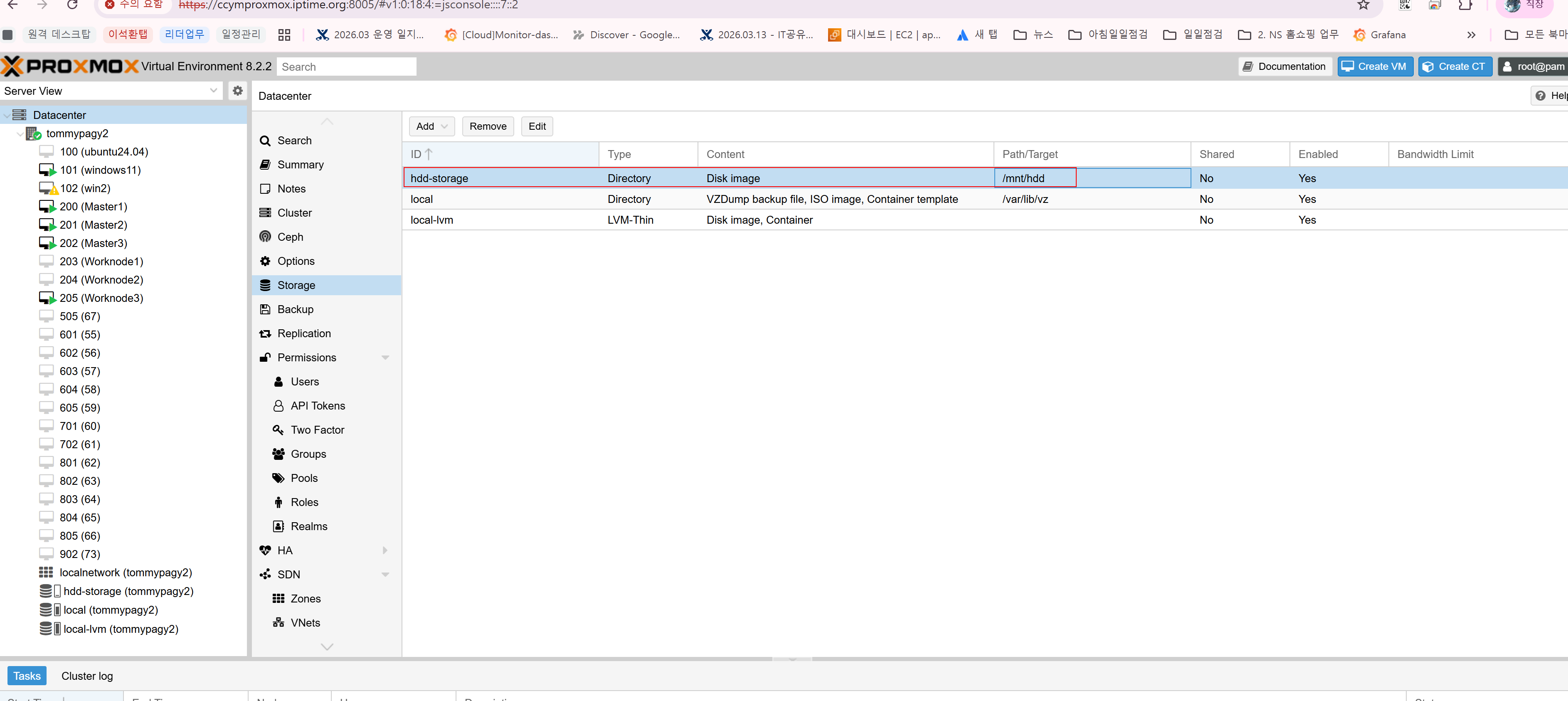
4.1 CLI (추천) 100 번 서버 부터 백업 시작.
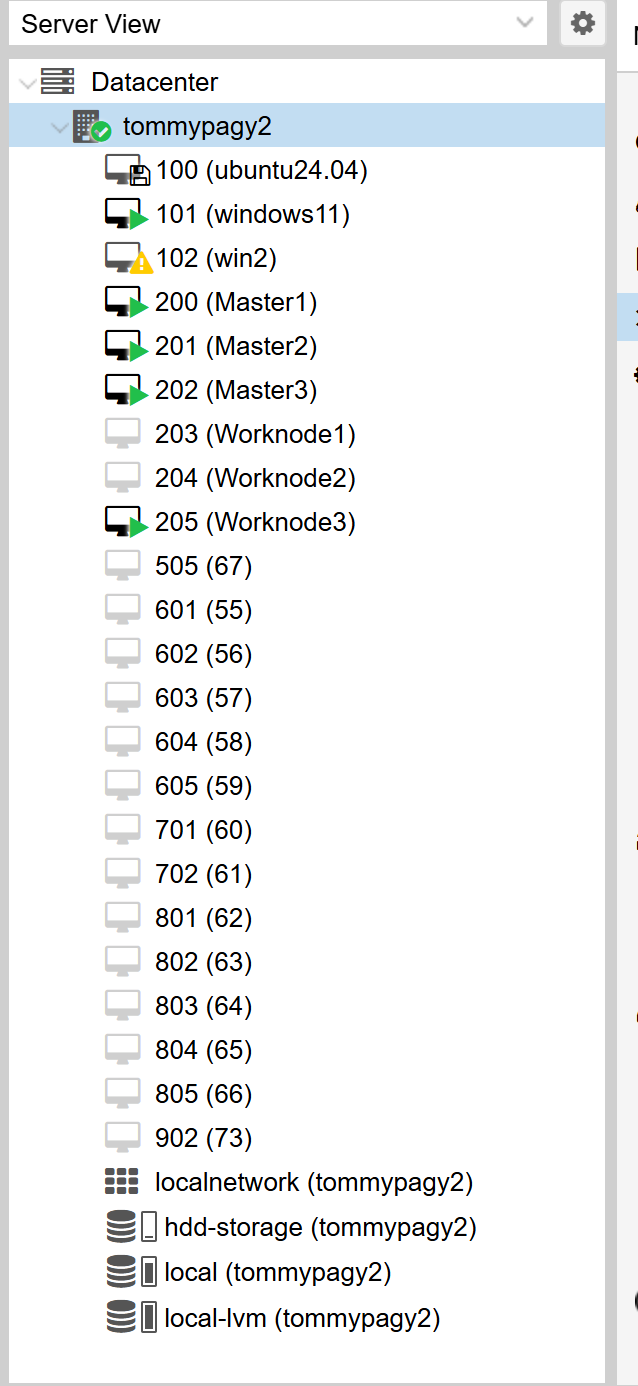
vzdump 100 --dumpdir /mnt/hdd --mode snapshot --compress zstd
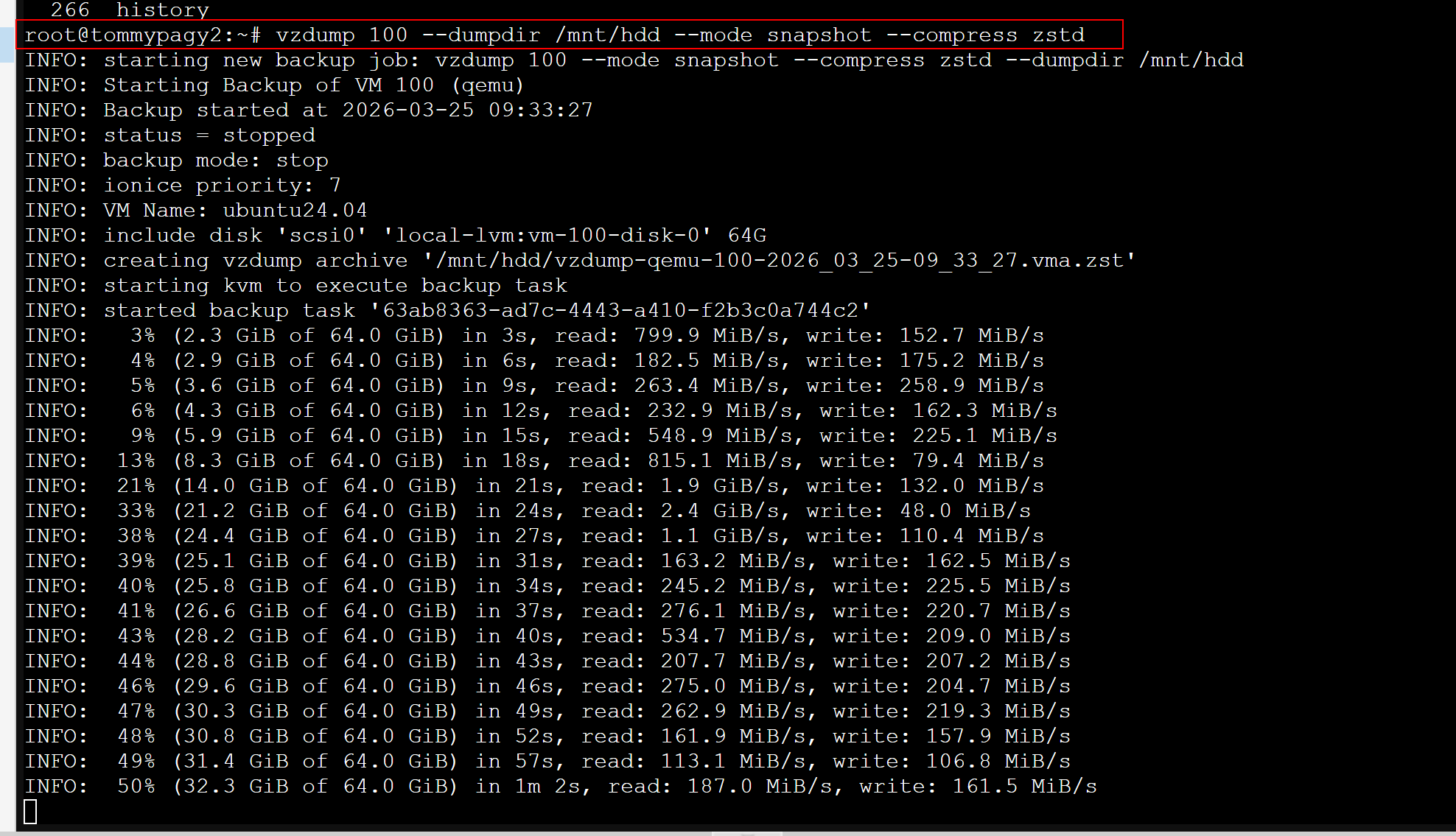
100번 서버 4.7G 확인

4.2 전체 백업
vzdump --all --dumpdir /mnt/hdd
| root@tommypagy2:~# vzdump --all --dumpdir /mnt/hdd INFO: starting new backup job: vzdump --dumpdir /mnt/hdd --all 1 INFO: Starting Backup of VM 100 (qemu) INFO: Backup started at 2026-03-25 09:47:47 INFO: status = stopped INFO: backup mode: stop INFO: ionice priority: 7 INFO: VM Name: ubuntu24.04 INFO: include disk 'scsi0' 'local-lvm:vm-100-disk-0' 64G INFO: creating vzdump archive '/mnt/hdd/vzdump-qemu-100-2026_03_25-09_47_47.vma' INFO: starting kvm to execute backup task INFO: started backup task '397bffd9-8e5f-451e-95a4-c74bde95bd78' INFO: 4% (2.6 GiB of 64.0 GiB) in 3s, read: 897.7 MiB/s, write: 246.4 MiB/s INFO: 5% (3.7 GiB of 64.0 GiB) in 6s, read: 350.3 MiB/s, write: 342.6 MiB/s INFO: 7% (4.8 GiB of 64.0 GiB) in 9s, read: 373.7 MiB/s, write: 285.0 MiB/s INFO: 13% (8.8 GiB of 64.0 GiB) in 12s, read: 1.4 GiB/s, write: 179.6 MiB/s INFO: 18% (11.5 GiB of 64.0 GiB) in 15s, read: 923.3 MiB/s, write: 132.0 MiB/s. . .중간생략 . INFO: 94% (60.3 GiB of 64.0 GiB) in 2m 11s, read: 2.9 GiB/s, write: 0 B/s INFO: 100% (64.0 GiB of 64.0 GiB) in 2m 13s, read: 1.9 GiB/s, write: 4.0 KiB/s INFO: backup is sparse: 53.17 GiB (83%) total zero data INFO: transferred 64.00 GiB in 133 seconds (492.8 MiB/s) INFO: stopping kvm after backup task INFO: archive file size: 10.84GB INFO: Finished Backup of VM 100 (00:02:15) INFO: Backup finished at 2026-03-25 09:50:02 INFO: Starting Backup of VM 101 (qemu) INFO: Backup started at 2026-03-25 09:50:02 INFO: status = running INFO: VM Name: windows11 INFO: include disk 'ide0' 'local-lvm:vm-101-disk-1' 100G INFO: include disk 'efidisk0' 'local-lvm:vm-101-disk-0' 4M INFO: include disk 'tpmstate0' 'local-lvm:vm-101-disk-2' 4M INFO: backup mode: snapshot INFO: ionice priority: 7 INFO: creating vzdump archive '/mnt/hdd/vzdump-qemu-101-2026_03_25-09_50_02.vma' INFO: attaching TPM drive to QEMU for backup INFO: started backup task '2de84e7a-333f-49d1-ae00-b6cbf5cf7f54' INFO: resuming VM again INFO: 1% (1.1 GiB of 100.0 GiB) in 4s, read: 270.1 MiB/s, write: 226.6 MiB/s INFO: 2% (2.2 GiB of 100.0 GiB) in 17s, read: 89.4 MiB/s, write: 89.4 MiB/s INFO: 3% (3.2 GiB of 100.0 GiB) in 43s, read: 38.3 MiB/s, write: 38.3 MiB/s INFO: 4% (4.0 GiB of 100.0 GiB) in 53s, read: 86.5 MiB/s, write: 86.5 MiB/s |
4.3 백업 확인
ls -lh /mnt/hdd
백업 진행사항 체크 1분당 35G->38G 약 3G 씩 전체 39% 진행중

5. 중요 체크
df -h /mnt/hdd
- /dev/sdb → ❌ 위험
- 다른 디스크 → ✅ 안전
6. 백업 우선순위
- 102 (오류)
- 101 (Windows)
- 100 (Ubuntu)
- 나머지
7. 복구 방법
qmrestore /mnt/hdd/vzdump-qemu-100-xxx.vma.zst 100
다른 스토리지:
qmrestore ... --storage local-lvm
8. 디스크 교체 절차
- 백업 수행
- VM 종료
- 디스크 교체
- 새 디스크 초기화
- 스토리지 등록
- VM 복구
9. RAID/ZFS 추천
ZFS Mirror (추천)
zpool create tank mirror /dev/sda /dev/sdb
- 자동 복구
- 데이터 무결성
10. 절대 금지
- 고장 디스크에 백업
- 동시에 여러 VM 백업
- 디스크 계속 사용
11. 최종 결론
"디스크 고장 진행 중 → 즉시 백업 후 교체 필수"
댓글
공지사항
최근에 올라온 글
최근에 달린 댓글
- Total
- Today
- Yesterday
링크
TAG
- Chroma
- Qdrant
- Ai
- faiss
- 쿠버네티스
- n8n
- kiwipiepy
- 5.4.0.1072
- poetry
- 테라폼
- chunking
- llm
- VectorStore
- 임베딩
- embedding
- 오라클
- Weaviate
- AWS
- RangChain
- MSA
- RAG
- KoSimCSE
- 버쳐박스
- 코로나19
- K8s
- Oracle
- CVE 취약점 점검
- MCP
- llama
- open ai
| 일 | 월 | 화 | 수 | 목 | 금 | 토 |
|---|---|---|---|---|---|---|
| 1 | 2 | 3 | 4 | 5 | 6 | 7 |
| 8 | 9 | 10 | 11 | 12 | 13 | 14 |
| 15 | 16 | 17 | 18 | 19 | 20 | 21 |
| 22 | 23 | 24 | 25 | 26 | 27 | 28 |
| 29 | 30 | 31 |
글 보관함